
Quick Guide
- Prepare 2 Red Mushrooms and 3 Wheat for one attempt.
- Interact with an alchemy cauldron and use its Brew tab.
- Set Red Mushroom to 2 and Wheat to 3 in separate slots.
- Press Brew and check the actual result; the recipe does not guarantee success.
The demonstrated ingredients for Potion of Vitality in Clover RPG are 2 Red Mushrooms and 3 Wheat. Put them into an alchemy cauldron, check the quantities and press Brew. The demonstrated result is a Minor Potion of Vitality; an attempt can still fail.
On this page
Potion of Vitality ingredients and quantities
For one demonstrated attempt, prepare two Red Mushrooms and three Wheat. These are the ingredient names used by the alchemy interface: use the quantity beside each ingredient rather than counting how many slots are occupied. This recipe uses two ingredient types, so a third ingredient is not part of the shown combination.
The sample identifies the mixture as Minor Potion of Vitality. Keep that name separate from an assumption about higher potion tiers: this page does not supply an unverified Standard or Superior recipe. Start with a single attempt while you compare your own interface with the recipe.
| Ingredient | Amount for one attempt | Interface check |
|---|---|---|
| Red Mushroom | 2 | Red Mushroom ×2 |
| Wheat | 3 | Wheat ×3 |
Open the cauldron and set the recipe
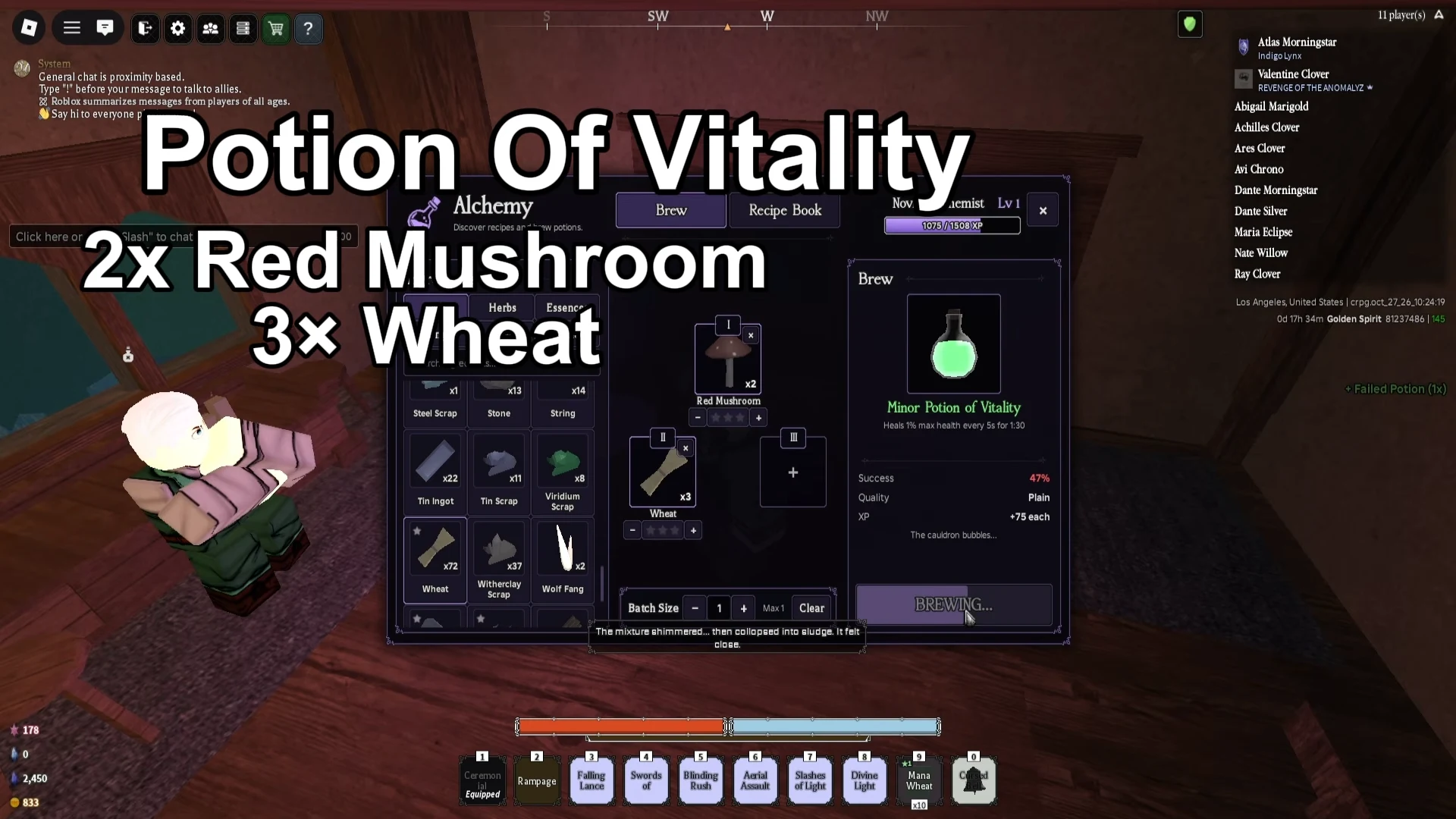
Approach an alchemy cauldron and use the interaction prompt. The reviewed example shows an E Brew prompt on PC. When the alchemy window opens, use the Brew tab to arrange the ingredients; Recipe Book is a separate tab. If you need the general menu and journal inputs first, use the PC controls guide.
Choose Red Mushroom for one ingredient slot and set its quantity to two. Choose Wheat for another slot and set its quantity to three. Read the labels and quantity markers again before spending the ingredients. An item sitting in your inventory is different from the quantity actually loaded into the recipe.
The cauldron interface separates batch size from ingredient quantities. For your first check, leave the batch at one and inspect the materials for that attempt. Do not interpret a larger batch selector as permission to use one copy of every ingredient for several potions. Larger-batch costs are outside this recipe.
Brew and check what you actually received
Once the quantities match, press Brew. Read the result of the attempt rather than treating a recognised potion name as a guaranteed item. In the demonstrated interface, the mixture can already be labelled Minor Potion of Vitality while another attempt produces a Failed Potion message.
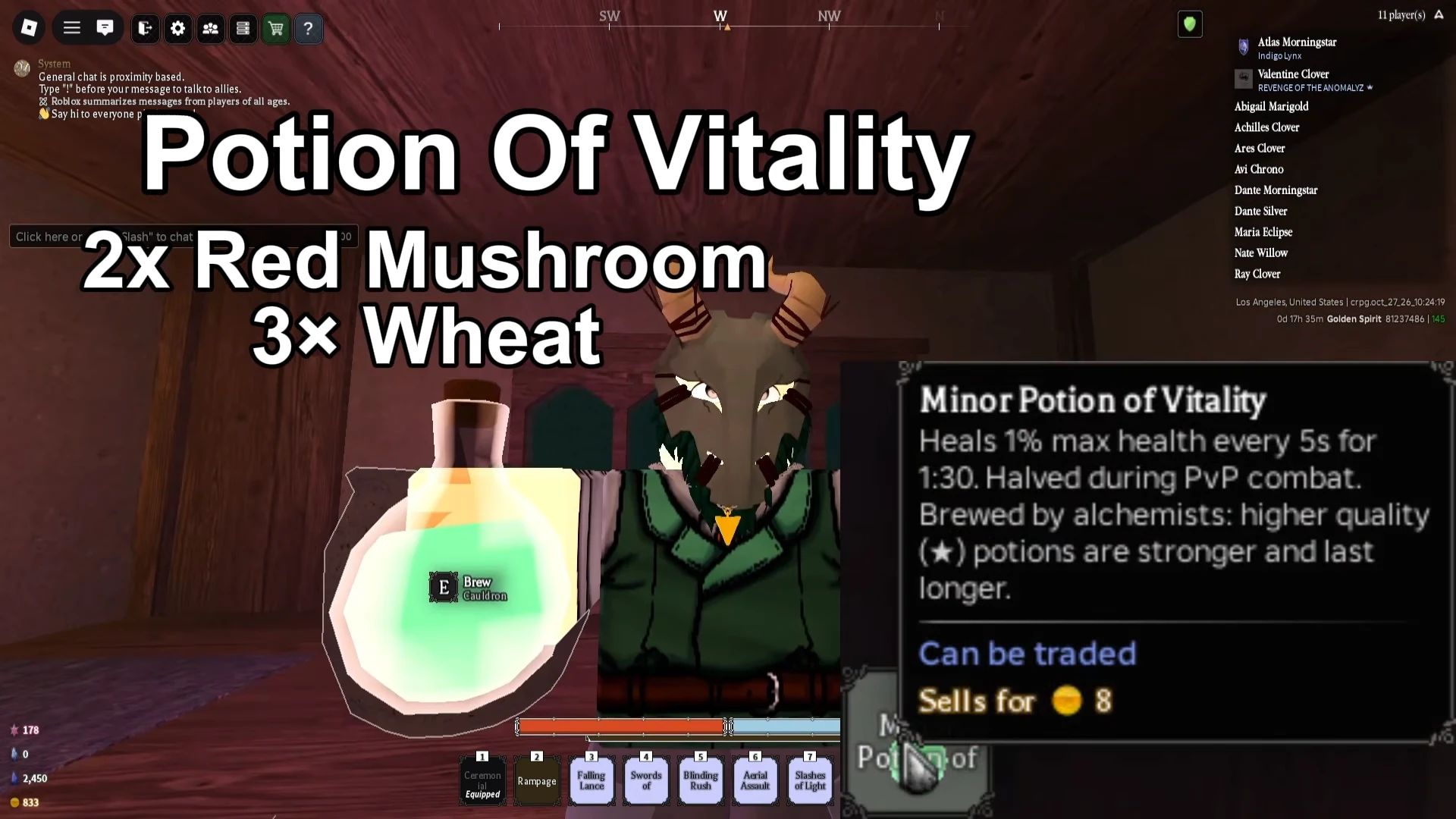
Look for the output notification and the item in your inventory after the attempt finishes. The footage also shows a held green potion with a Minor Potion of Vitality item description. That item name is a useful identity check; it is different from the progress animation while the cauldron is still brewing.
What a Failed Potion result tells you
A failed attempt does not, by itself, establish that you selected the wrong recipe. The reviewed recording displays the correct ingredient combination and a named potion alongside failure messages. That supports checking both the recipe and the individual brew result instead of changing ingredients after every failure.
If your quantities differ, correct those quantities before trying again. If they match, read the success information shown by your own character. The percentage in another player’s recording belongs to that sample and is not a universal success rate. No retry count or guaranteed ingredient budget has been established here.
Prepare materials without mixing up the target
The source footage shows a Red Mushroom gathering interaction and identifies Wheat with Kamo Village. It does not establish a complete, repeatable gathering route for both ingredients, a respawn timer or a minimum tool level. Bring materials you can identify by the inventory labels rather than substituting another mushroom or another plant.
This is a potion recipe, not a route for Glow Lily or Mana Bloom. Keep those resource searches separate. If you are still working through the opening village tasks, the beginner route helps you choose your next story objective; it does not replace the quantities in the recipe above.
Video guides
See the choices in play
Use these related videos alongside the written explanations and your own in-game interface.
YouTube
Clover RPG: Potion of Vitality Recipe
Compare the ingredient slots and potion result with the brewing steps above.
Frequently Asked Questions
How much Wheat do I need for Potion of Vitality?
The demonstrated recipe uses 3 Wheat and 2 Red Mushrooms for one attempt.
Does the correct recipe always produce a potion?
No. The reviewed recording shows failure messages even with the named mixture. Check your own success panel and the actual result.
Is this the recipe for Superior Potion of Vitality?
The observed mixture is identified as Minor Potion of Vitality. A separate higher-tier recipe has not been established here.
Sources
Reviewed 30 October 2026. Recipe UI: crpg.oct_27_26; corroborating narration: crpg.oct_26_26. Current-patch applicability, full ingredient-location routes and a universal success rate remain unverified.